Published: February 12, 2024 | Last updated: October 15, 2026
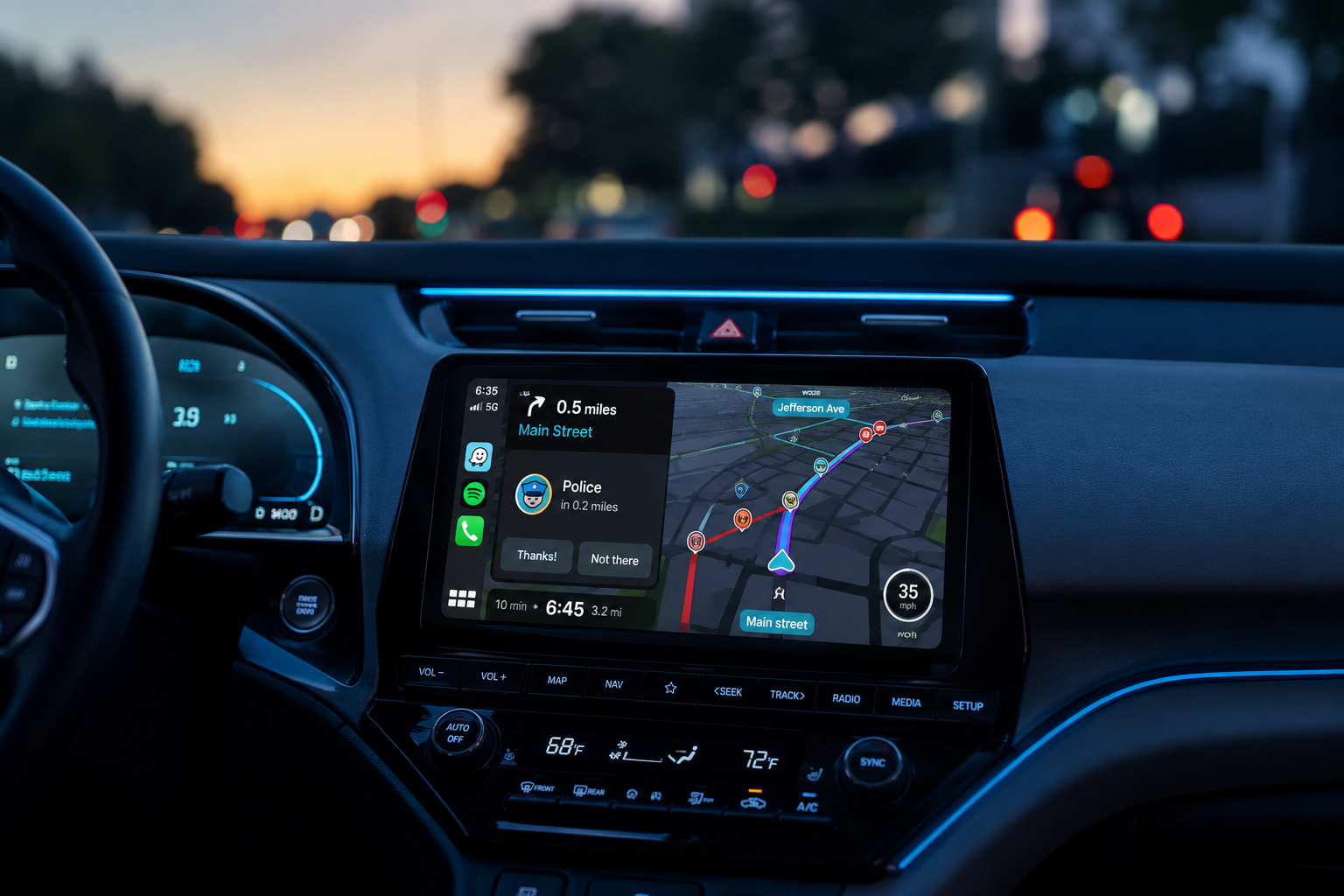
Waze on Android Auto puts live traffic, police reports and hazard alerts on your car's dashboard screen, but getting it to appear, stay as your main map and keep showing your ETA is where most drivers get stuck. This guide covers how to use Waze on Android Auto from first connection to fixing the problems we see most often in reader questions.
Quick Answer: Yes, Waze works with Android Auto. Install Waze from the Google Play Store, connect your phone to your car by USB or wireless Android Auto, then tap the Waze icon on the car screen. If Waze is missing, open Android Auto settings on your phone, go to Customize launcher and tick Waze.
Screen2Auto mirrors any phone app to Android Auto with touch control from your head unit, for passengers or while parked. Install it in about 2 minutes through AAStore. No root or PC needed.
Prefer an automated setup? Use the AAAD installer. Wondering if it is safe? Read our Screen2Auto safety guide.
Does Waze work with Android Auto?
Yes. Waze is one of the officially supported navigation apps on Android Auto, alongside Google Maps. It is not a mirrored copy of the phone app. Android Auto runs a car optimized version of Waze with larger buttons, voice control through Google Assistant and the same crowd sourced alerts you see on your phone. Google's own Use Waze on Android Auto help page confirms you can navigate by voice, type destinations while parked, open saved places and submit reports from the car display.
What you need:
| Requirement | Details |
|---|---|
| Phone | Android phone that runs the current Android Auto app. Check the official compatibility list. |
| Car or head unit | Factory or aftermarket display with Android Auto support (wired or wireless). |
| Waze app | Latest version from the Google Play Store, installed in your main profile. |
| Connection | USB data cable, built-in wireless Android Auto, or a wireless adapter. |
| Data | Mobile data for live traffic, rerouting and reports. |
How do you add Waze to Android Auto?
Adding Waze to Android Auto takes about two minutes, and the steps are the same on wired and wireless connections:
- Install or update Waze from the Google Play Store on your phone. Open it once and accept the location permission.
- Connect your phone to the car. Use a USB data cable, or pair over Bluetooth if your car supports wireless Android Auto.
- Open the Android Auto launcher on the car screen by tapping the app grid icon.
- Tap Waze. The map loads and shows your current location within a few seconds.
- If Waze is not in the launcher, open Android Auto settings on your phone, go to Customize launcher and tick Waze. You can also drag it to the first position.
- Set your destination by saying "Hey Google, navigate to [place] using Waze" or by typing while parked.
How do you make Waze the default navigation app on Android Auto?
Android Auto does not have a single "default maps" switch. Instead, it reopens the navigation app you used most recently. To make Waze the app that loads every drive:
- Use Waze for one full route. Start navigation in Waze on the car screen. The map shortcut on the Android Auto dashboard will now open Waze on later drives.
- Move Waze to the front of the launcher. In Customize launcher, drag Waze above Google Maps so it is the first app you see.
- Say "using Waze" in voice commands. Google Assistant favors Google Maps unless you name Waze, for example "Navigate to work using Waze".
- Start the route on your phone first. If Waze is already navigating when you connect, the route moves to the car screen automatically.
If Google Maps keeps taking over, open Google Maps once on the phone, end any active navigation there, then start your next route in Waze.
Why is Waze not showing on Android Auto?
When Waze is missing from Android Auto, the cause is almost always a settings issue rather than a broken app. Most "missing Waze" reports are fixed with one of these checks:
| Cause | Fix |
|---|---|
| Waze unticked in the launcher | Android Auto settings, Customize launcher, tick Waze. |
| Outdated Waze or Android Auto | Update both in the Play Store, then reconnect. |
| Waze installed in a work profile or Secure Folder | Install Waze in your main personal profile. Android Auto cannot see apps in separate profiles. |
| Waze never opened on the phone | Open Waze on the phone once and grant location access before connecting. |
| Car paired before Waze was installed | Disconnect, restart the phone and reconnect so Android Auto rescans apps. |
How do you fix Waze not working on Android Auto?
Start with the quick reset: disconnect the phone, force stop both Waze and Android Auto in your phone's app settings, then reconnect. If the problem returns, use the fix for your symptom below.
Waze shows a black screen or freezes
- Go to Settings, Apps, Waze, Storage and tap Clear cache. Repeat for Android Auto.
- Set battery usage for Waze and Android Auto to Unrestricted.
- Set Waze location permission to Allow all the time.
- Replace the USB cable if you use a wired connection. A worn cable is the most common cause of freezes on wired setups.
The ETA, time or distance is missing
Tap the bottom route bar on the car screen to expand it. If it stays blank, Waze has likely lost its data connection. Check mobile data, turn off any VPN, and restart the route. A "Waiting for network" message means the ETA is frozen at the last good connection.
The phone screen goes blank when Android Auto connects
This is normal on many phones. Android Auto moves navigation to the car display and the phone shows a simple Android Auto screen or locks. You can still unlock the phone and open Waze on it if a passenger needs the full app.
Waze stopped working after an Android Auto update
Android Auto updates occasionally break Waze for a short period. In early 2026, Waze users on the r/waze community reported a bug that was fixed in a later Android Auto release. Update both apps first. If the problem started with an update, check the Waze community forum before uninstalling anything.
Waze lags on a wireless adapter
Lag of one to two seconds is common on wireless Android Auto adapters. Keep the adapter firmware updated, use the 5 GHz Wi-Fi band if your adapter lets you choose, and avoid running a hotspot on the same phone. If lag persists, a better adapter or a wired cable usually fixes it.
Which wireless adapter works best with Waze on Android Auto?
If your car only supports wired Android Auto, a wireless adapter lets Waze start automatically when you get in. Look for an adapter with current firmware updates, a 5 GHz connection and fast reconnect after the car restarts. Browse Android Auto wireless adapters at the AAHacks shop.
Can you use Waze in split screen on Android Auto?
Yes. Waze works in the Android Auto split screen dashboard, so you can see the map next to your music, SiriusXM app or call card. Tap the layout button to move the map into the larger panel. Some vehicles, such as recent Ram trucks with Uconnect, add their own split screen around Android Auto. In that case, which side shows Waze is set in the car's display settings, not in Waze.
Can you run Waze and Google Maps at the same time?
Not on the car screen, because Android Auto only shows one navigation app at a time. As Android Authority tested, you can start a route in Waze on your phone, connect to Android Auto, then open Google Maps on the car display. Waze keeps giving audio alerts from the phone while Google Maps shows the map. Their test measured about 14.9% battery drain per hour with this setup, so keep the phone charging.
Can you mirror the full Waze phone app with Screen2Auto?
The Android Auto version of Waze hides some phone features. If you want the complete phone interface on your car display while parked, for example to plan a multi-stop trip or check Waze settings on a bigger screen, Screen2Auto mirrors your phone to Android Auto with touch control from the head unit.
AAStore handles the installation so Android Auto recognizes Screen2Auto, with no root or PC required.
Prefer an alternative setup? Use the AAAD installer.
Use mirroring only while parked. Native Waze on Android Auto remains the right choice while driving.
Not sure about installing an app from outside the Play Store? Is Screen2Auto safe to use? explains the permissions it needs, how your data is handled and the two official download sources.
Is Waze better than Google Maps on Android Auto?
Waze is better for daily commuting and alerts. Google Maps is better for long trips, offline areas and finding places. Waze's 2026 update added alerts for sharp bends, speed bumps, tolls, speed limit drops, roundabout instructions and emergency vehicles on your route, according to Android Police.
| Feature | Waze | Google Maps |
|---|---|---|
| Real-time hazard alerts | Excellent (crowd sourced) | Good |
| Police and speed camera reports | Detailed | Limited |
| Speed limit warnings | Yes, with current speed | Yes |
| Offline maps | Partial (active route only) | Full offline areas |
| Multi-stop routes | Limited | Multiple stops |
| Business and place search | Basic | Comprehensive |
| Best for | Commuters, traffic-heavy cities | Road trips, poor signal areas |
Other navigation apps for Android Auto
If neither Waze nor Google Maps fits how you drive, these guides cover the main alternatives:
- TomTom GO on Android Auto: setup, offline maps and speed camera alerts.
- Sygic on Android Auto: offline navigation for road trips and poor signal areas.
- HERE WeGo on Android Auto: free maps with downloadable regions.
- Petal Maps on Android Auto: whether it works and how to get it on your car screen.
How did we test Waze on Android Auto?
We tested Waze on a wireless Android Auto setup to check connection speed, stability and the most common reader problems.
- Phone: Google Pixel 9 Pro
- Head unit: 2025 Honda Civic infotainment system, wireless Android Auto
- Conditions: 5G mobile data, Spotify and Google Assistant running in the background
- Duration: 30-minute drive plus parked tests
Results:
- The wireless connection took about 12 seconds after ignition. Waze rendered the map 8.5 seconds after we tapped it in the launcher.
- Rapidly switching between Spotify and Waze did not cause a black screen. We saw a delay of about 1 second during the switch.
- Voice requests went to Google Maps unless we said "using Waze".
- Our "missing Waze" test was fixed by ticking Waze in Customize launcher, which confirms most missing app reports are configuration issues.
Frequently asked questions
Does Waze work with Android Auto?
Yes. Waze is an officially supported navigation app on Android Auto. Once Waze is installed on your phone and you connect to a compatible car display by USB or wirelessly, Waze appears in the Android Auto launcher with live traffic, police and hazard alerts, voice guidance and saved places such as Home and Work.
Why is Waze not showing on my Android Auto screen?
The most common cause is that Waze is unchecked in the Android Auto launcher settings. Open Android Auto settings on your phone, go to Customize launcher and tick Waze. If it is still missing, update Waze and Android Auto, and make sure Waze is not installed inside a work profile or Secure Folder.
How do I make Waze my default navigation app on Android Auto?
Android Auto opens the navigation app you used last. Launch Waze once from the car screen and start a route, and the map shortcut will reopen Waze on later drives. For voice requests, add "using Waze" at the end, for example "Navigate to work using Waze", so Google Assistant does not route through Google Maps.
Can I use Waze and Google Maps at the same time on Android Auto?
Not on the car screen. Android Auto runs one navigation app at a time. A common workaround is to start a route in Waze on your phone before connecting, then open Google Maps on the car display. Waze keeps giving audio alerts from the phone, but battery drain and heat increase noticeably.
Why are the ETA, time and distance missing in Waze on Android Auto?
Missing ETA, time or distance usually means the route panel is collapsed or Waze lost its data connection. Tap the bottom bar on the car screen to expand it. If it still shows nothing, check that mobile data is on, disable any VPN, then disconnect, force stop Waze and reconnect to Android Auto.
Does Waze work with Android Auto split screen?
Yes. On current Android Auto versions, Waze runs in the split screen dashboard layout next to media and notification cards. You can swap the map to the larger panel with the layout button. Some cars add their own split screen on top of Android Auto, and that view is controlled by the vehicle, not by Waze.
Do I need wireless Android Auto to use Waze?
No. Waze works the same over a USB data cable or a wireless connection. Wireless Android Auto needs a car or head unit that supports it, or a wireless adapter plugged into the USB port. Wired connections usually start faster and keep the phone charged on long drives.
Can I use Waze on Android Auto without an internet connection?
Only partly. Waze caches the active route once navigation starts, so guidance continues through short signal drops. You cannot search, reroute around new traffic or load fresh reports without data. If you drive through areas with poor coverage, start your route while you still have a strong signal.
Will Waze drain my phone battery faster on Android Auto?
Yes. Waze uses GPS, mobile data and the screen projection link at the same time, and wireless Android Auto adds extra drain because the phone also keeps a Wi-Fi link to the car. A wired USB connection usually charges the phone while you drive. On long trips, keep the phone on a charger or wireless pad.
Can I use Waze in a car that already has built-in navigation?
Yes. Android Auto runs on top of the factory system, so you can choose Waze instead of the built-in maps whenever your phone is connected. Many drivers prefer this because Waze traffic and hazard data updates in real time, while factory map data often depends on paid or dealer updates.
Safety note: Set your destination before you drive or use voice commands. Only type, report or use screen mirroring while parked, and follow local traffic laws.
Waze handles navigation. Screen2Auto lets passengers use any phone app on the car display, and you can use it while parked. Get it through AAStore in a few minutes.