Last Updated: June 15, 2026
Does WhatsApp Work on Android Auto
Yes. WhatsApp is added to Android Auto automatically once the official WhatsApp Messenger app is installed on your phone. There is no separate Android Auto version to download and usually no manual setup step.
How to Enable WhatsApp on Android Auto
Step 1: Install WhatsApp
Make sure the official WhatsApp Messenger app is installed and signed in on your Android phone.
Step 2: Check Notification Access
If android auto WhatsApp notifications are not appearing on your car display, confirm notification access is enabled: on your phone, go to Settings > Apps > WhatsApp > Notifications, then check Settings > Apps > Android Auto > Notifications to make sure WhatsApp is allowed through.
Step 3: Use Voice Commands
- New messages appear as a notification banner on your car display.
- Tap the notification to have Google Assistant read the message aloud.
- Say "Reply" and dictate your response. Google Assistant will confirm before sending.
Understanding WhatsApp Limitations on Android Auto
The native integration of WhatsApp on Android Auto is primarily designed for safety and hands-free use. Consequently, the application is not yet fully developed for comprehensive messaging. Currently, many standard WhatsApp features are disabled while driving, such as:
- You cannot listen to audio messages, nor view photos, videos, or animated GIFs.
- Android Auto does not support WhatsApp voice or video calls. If a contact attempts to call you via WhatsApp while you are connected, you will not receive a notification, as the system prioritizes road safety and driver focus.
Want Full WhatsApp Functionality?
While the native Android Auto integration is great for basic messaging, it is intentionally limited for safety. If you find yourself needing to access full chat histories, view photos, or handle WhatsApp calls while parked, the standard interface simply won't suffice.
To unlock the complete WhatsApp experience, we can use third-party mirroring tools. Here is your roadmap to achieving this safely.
Method 1: Installing via AA Store
AAStore is often preferred because it offers a wider catalog and frequent updates.
- Search for "AAStore" on your phone's browser and download the official APK or you can use above button to install.
- Open the file to install the AAStore app on your phone.
- Open AAStore and search for Screen2Auto in the app list.
- Tap the "Install" button next to Screen2Auto.
- Once the download completes, tap the installation prompt. You may need to enable "Install from Unknown Sources" in your phone's settings if prompted.
Method 2: Installing via AAAD
If you already use AAAD (Android Auto Apps Downloader), you can stick with it.
- Launch the AAAD app on your phone.or easliy you can access through above button.
- Look through the list of available apps on the home screen.
- Tap on Screen2Auto. The app will download and then ask you to confirm the installation.
- Tap "Install," then "Done."
How to Set It Up for WhatsApp
Once the app is installed, you need to configure it so it actually works on your car screen:
- Open the Screen2Auto app on your phone. You must grant it permissions like "Display Over Other Apps" and "Accessibility". Without these, the app won't be able to mirror your screen properly.
- Inside the app, look for a "Patch" or "Configure" option (if required by your version) to ensure it can communicate with Android Auto.
- Plug your phone into your car or connect wirelessly.
- Open your car’s Android Auto display, look for the Screen2Auto icon, and tap it. Your phone screen will now appear on your car display, allowing you to open the full WhatsApp app.
- On your car’s Android Auto display, find the Screen2Auto icon and tap it. Your phone’s full screen will now appear on your dashboard.
Answering WhatsApp Calls (Xiaomi + Android 15)
Now that your screen is mirrored, you have full control over your phone’s interface. Here is how to handle a WhatsApp call while using this setup (Tested on Xiaomi devices running Android 15 with WhatsApp v2.26.26.73):
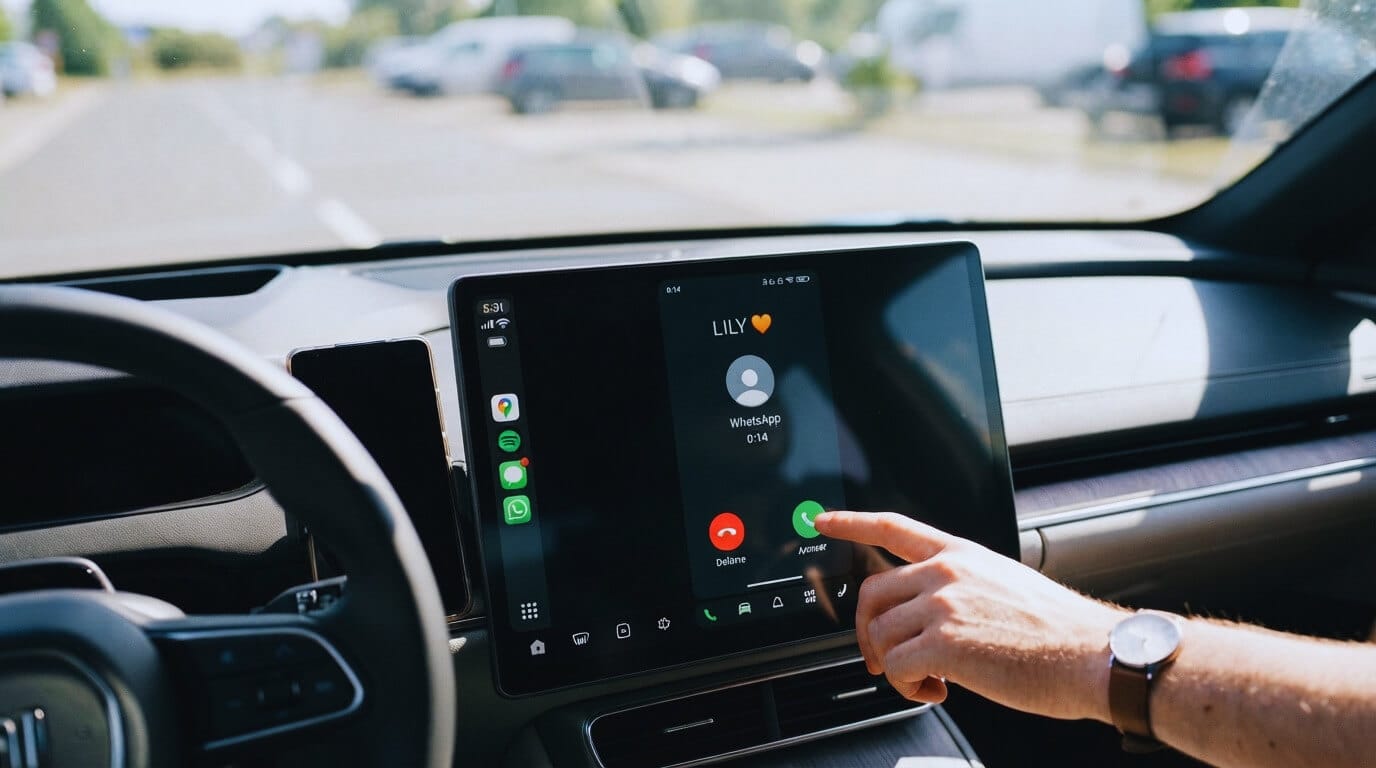
- When a WhatsApp call arrives, because your phone is mirrored, you will see the exact same incoming call screen on your car's dashboard as you do on your phone.
- Simply tap the "Answer" (Green button) on your car’s touchscreen.
- Since the phone is connected via Bluetooth, the car's speakers and microphone handle the audio seamlessly. You are essentially using your car as a giant monitor and speakerphone for your phone's WhatsApp.
An Alternative Solution: Fermata Auto
If you find Screen2Auto difficult to use or unstable, Fermata Auto is a great alternative.
- It is an "all-in-one" media center that includes screen mirroring, video playback, and web browsing.
- Many users find it more stable and polished than Screen2Auto.
- You can download Fermata Auto using the exact same methods (AAStore or AAAD) mentioned above.
Quick Tip for Success: If the app doesn't show up on your car screen, go to your phone's Android Auto Settings > Developer Settings and make sure "Unknown Sources" is checked. This tells Android Auto to allow these third-party apps to appear!
Troubleshooting
If WhatsApp is not appearing or notifications have stopped:
- Recheck permissions: Ensure notifications are enabled for both WhatsApp and Android Auto.
- Restart and Reconnect: A reboot or fresh USB/Bluetooth connection resolves most sync issues.
- Update Apps: Ensure both WhatsApp and Android Auto are updated.
- Check Battery Settings: For Screen2Auto, ensure battery restrictions are set to "Unrestricted" so the app isn't killed in the background.
- Enable Unknown Sources: If apps don't appear, go to Android Auto Settings > Developer Settings and ensure "Unknown Sources" is checked.
How to Optimize Performance on Samsung and Xiaomi Devices
Configuring your phone’s settings correctly is essential for a stable and frustration experience with Android Auto.
1. Xiaomi / Redmi / POCO Users (Battery Settings)
The aggressive battery-saving features on Xiaomi devices often force-close background apps, which can cause Android Auto to disconnect unexpectedly. To keep your connection stable:
- Open your phone Settings.
- Navigate to Apps > Manage Apps and locate both Android Auto and WhatsApp.
- Under the battery settings, change the Battery Saver option to "No restrictions" or "Unrestricted". This prevents the system from killing the app in the background while you are driving.
2. Samsung Users (Automation with Modes and Routines)
Samsung devices offer a powerful tool called Modes and Routines that allows you to automate your connection process. You can set your phone to trigger Android Auto the moment it detects your car's Bluetooth signal.
- Go to Settings > Modes and Routines.
- Tap the "Routines" tab and press the "+" icon to create a new routine.
- Select "Connected to Bluetooth" and choose your car's Bluetooth device.
- Set it to "Start Android Auto" or "Open App > Android Auto".
- Once configured, your phone will automatically launch the interface as soon as you enter your vehicle.
Pro Tip: Incorporating these device-specific steps into your article will significantly reduce common user complaints regarding connection drops and startup issues, establishing your guide as a highly reliable resource.
Frequently Asked Questions
Does WhatsApp work on Android Auto?
Yes. WhatsApp is added automatically once installed on your phone, and messages can be heard and replied to by voice through Google Assistant.
Can I view WhatsApp photos or chat history on Android Auto?
Not through Android Auto's native integration. You need Screen2Auto to mirror your full phone interface and view photos or chat history while parked.
Why is WhatsApp not showing up on Android Auto?
The most common causes are notification permissions being disabled, an outdated app version, or a connection glitch. Recheck notification settings, update both apps, and restart your phone.
Can I make WhatsApp video calls on Android Auto?
Not through the native voice/notification integration. Running WhatsApp on an AI box or through Screen2Auto's full mirroring is currently the way to access WhatsApp video calls on your car display while parked.
Disclaimer: Please note that screen mirroring apps are for use while the vehicle is parked. Always prioritize road safety. Using these tools while driving can be distracting and may violate local traffic regulations. Use responsibly.